Set up your suspension like it's race day
MSM Setup gives you a starting setup for your bike, checks your sag, and after every ride tells you the one change to make next. Built by Matej Skuzin, World Cup XCO mechanic.
Why riders use it
- Your bike, not a chart. The setup follows your weight, your fork and shock, your wheels and tyres, the track and the day.
- One clear change at a time. Tell it how the bike felt and you get one change with the reason why. No guessing, no ten clicks at once.
- Every track remembered. Save what you rode, open it next season and start from what already worked.
- A real mechanic behind it. Matej personally follows every rider and can send you a setup made just for you.
How it works
Four steps. The first two are free.
Tell it about your bike
Weight with kit, discipline, fork and shock, wheels, tyres and the track you ride. It takes about a minute, and the app remembers it.
Works with Fox 32 and 34 Step-Cast, RockShox SID and SID SL, including Flight Attendant, Cannondale Lefty Ocho and DT Swiss.
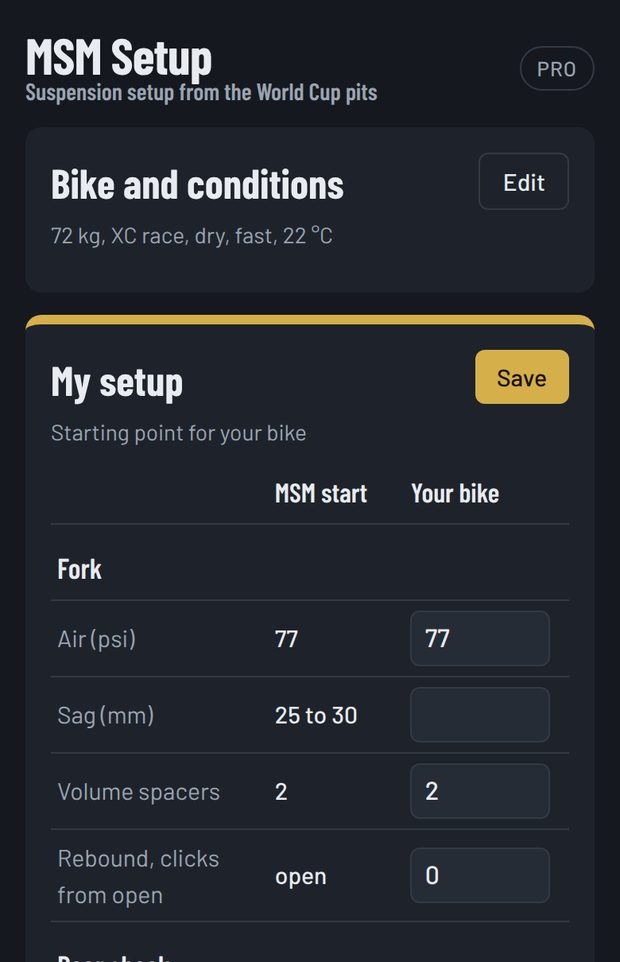
Measure sag and write down what you ride
Set the fork pressure it gives you, measure sag and type in what you see. It tells you straight away if you are in range or what to change.
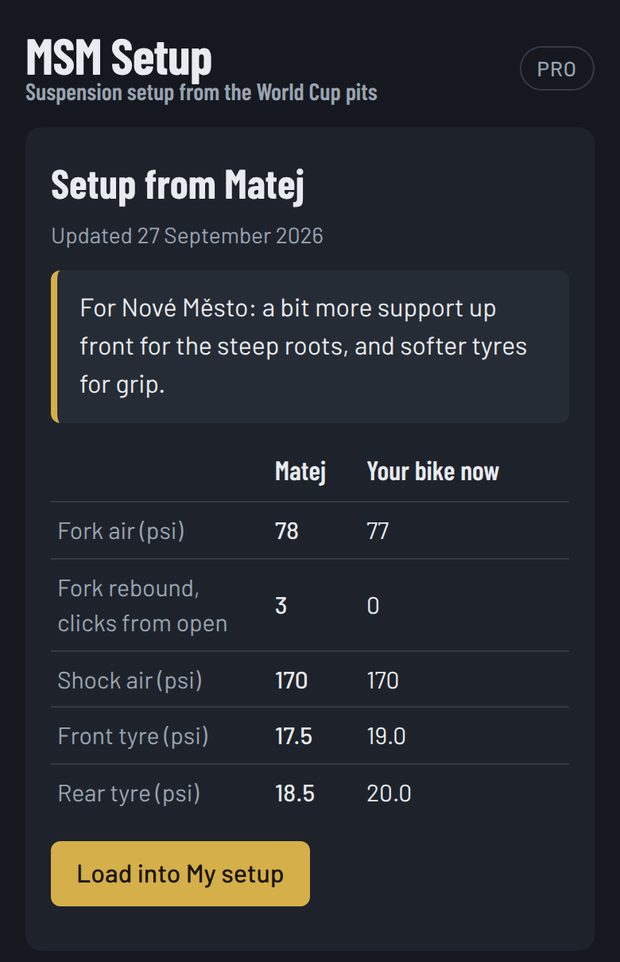
The "Your bike" column becomes your reference: pressures, spacers, clicks and tyres, all in one place.
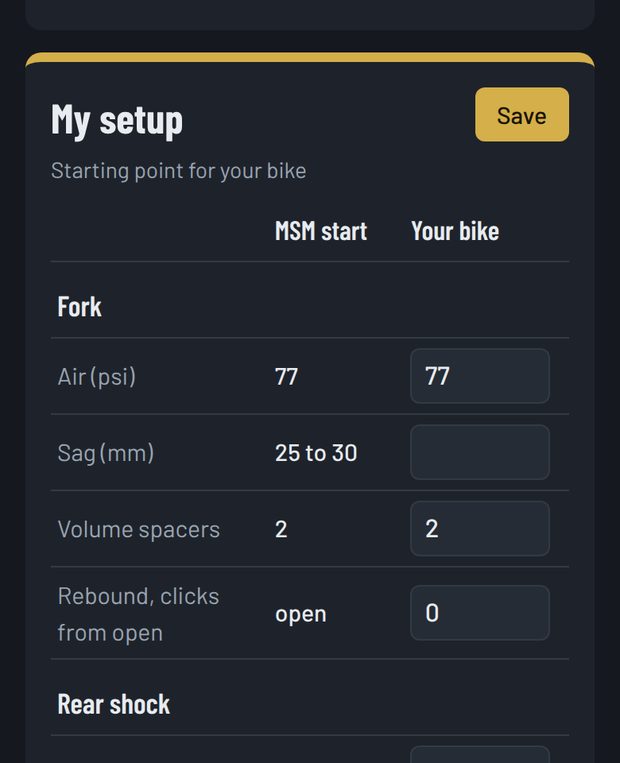
Ride, then tell it what felt wrong
Harsh on small bumps, the rear kicks you forward, the fork dives on steep ground. Pick what you felt and get one change with the reason why. Ride the same section again and ask yourself one question: better or worse?
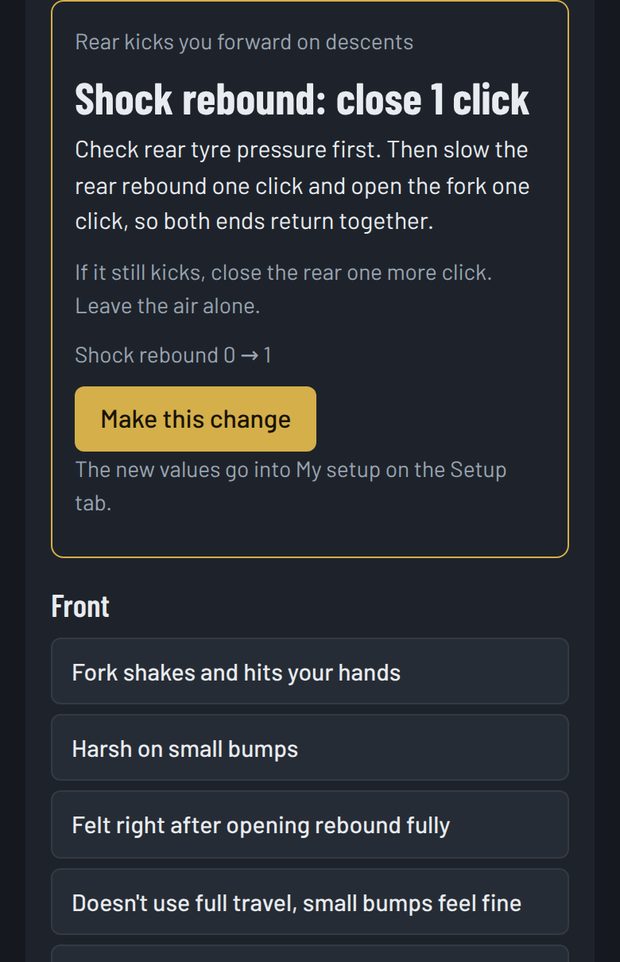
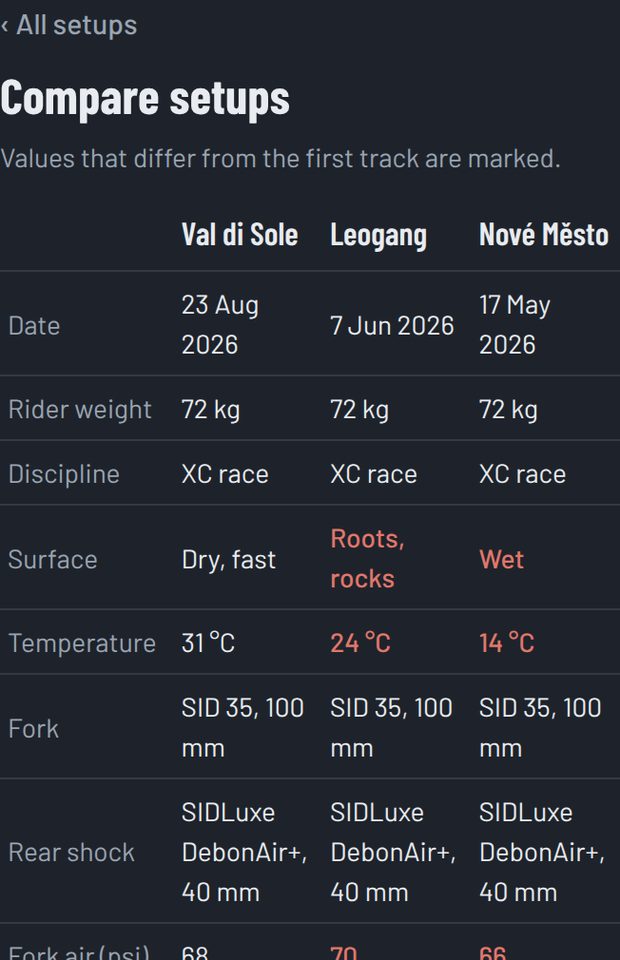
Save every track and compare
Save your setup after each race or ride. Tick two or three tracks to compare them side by side, and download any setup as a PDF for your notes or your mechanic.
Your setups are there on your phone and your laptop.
Matej in your corner
MSM Setup isn't only an app. Matej personally reviews the riders who use it, and when he sees something he can send you a setup made for your bike. It appears in the app, and one tap loads it into your table.
Every licence also includes a 15 minute video or phone call with him. Your current setup goes with the request, so the call starts from where your bike is now.
MSM Advisor, in Pro
Describe in your own words what the bike did, where and how it felt, at any time of day. MSM Advisor asks what it needs to know and suggests one change, calculated by Matej's setup rules and within safe limits for your fork, shock and tyres. One tap puts it into your setup.
It knows your bike, your saved tracks and every change you rated better, the same or worse, so it doesn't repeat what didn't work and builds on what did. From your conversations it keeps a short profile of how you ride, which Matej reads before your monthly call.
MSM Advisor is an AI assistant, not a person. Matej reads the conversations and can reply himself; his replies are shown with his name.
Free, Basic or Pro
| Free | Basic | Pro | |
|---|---|---|---|
| Fork pressure and sag targets | ✓ | ✓ | ✓ |
| Sag check and your own setup table | ✓ | ✓ | ✓ |
| Full setup: spacers, rebound, compression, tyres | – | ✓ | ✓ |
| Corrections for the track and the day | – | ✓ | ✓ |
| Tuning after every ride, 30 symptoms | – | ✓ | ✓ |
| Rate every change: better, same or worse | – | ✓ | ✓ |
| My setups, compare and PDF | – | ✓ | ✓ |
| Setups from Matej | – | ✓ | ✓ |
| 15 minute call with Matej | – | once | every month |
| MSM Advisor, AI assistant on Matej's rules | – | – | 40 messages a month |
| Your rider profile, followed by Matej | – | – | ✓ |
| Replies from Matej in the app | – | – | ✓ |
Basic
The full app and one call to set up your bike. For riders who want a good setup and then tune it themselves after every ride.
Pro
Everything in Basic, plus:
- a 15 minute call with Matej every month, not just once
- MSM Advisor: describe the problem in your own words and get the next change, any time
- a rider profile Matej follows from month to month
- replies from Matej directly in the app
One payment, no subscription, it does not renew by itself. Please read the terms of sale before you buy.
Your first 15 minutes
- Open MSM Setup on your phone, next to the bike. You need a shock pump and a tape measure or ruler.
- Fill in Bike and conditions and tap Show my setup.
- Pump the fork to the pressure in the table.
- Push the O ring against the seal, get on the bike in your riding position, step off gently and measure the O ring. Do the same for the shock.
- Type the sag and the pressures into Your bike. Follow what the table says until both are in range.
- With the full version: tap Save, give it the name of your local loop, and go ride.
Questions
Which bikes is it for?
Cross-country and marathon full suspension bikes. On the list: Fox 32 and 34 Step-Cast, RockShox SID and SID SL, Cannondale Lefty Ocho, DT Swiss, Fox Float and DT Swiss shocks and RockShox SIDLuxe with Solo Air or DebonAir+, with or without Flight Attendant. If your fork or shock isn't listed, choose Other and it still works.
Do I need to service the suspension first?
If the fork and shock haven't been serviced in the last 12 months or 250 hours, the app will tell you to do that first. No setup can make worn oil and dry seals feel right.
How do I pay and when do I get my code?
You order in the app and pay by bank transfer. When the payment arrives, your licence code comes by email together with the invoice, usually within 24 hours.
Can I use it on my phone and my laptop?
Yes, on up to two devices. On the second one choose "Sign in with a code from your email", and type in the 6 digit code you get by email.
When does the 12 months start?
On the day you first activate your code, not the day you pay.
How does the call with Matej work?
Request it in the app under Matej, with what you want to talk about and when you can talk. You get a confirmation by email with the time. Calls are by video or phone and last up to 15 minutes.
Is MSM Advisor a person?
No. MSM Advisor is an AI assistant built on Matej's setup rules. It never invents settings: every change it suggests is calculated by the same rules as the rest of the app. Matej reads the conversations and, when he replies himself, his message is shown with his name.
Can I move from Basic to Pro?
Yes, at any time during your licence. Email us and you only pay the difference.
Is it only in English?
The app is in English. You can write to us in English or Croatian at msmechanic33@gmail.com.
Start with the free part
No sign-up. Enter your bike and get your fork pressure and sag targets in a minute.